[Note: In the following bit-too-long rant, some information has been changed to protect identities. But the name of my no-good, awful, deceitful former web host Doteasy has been left completely intact. Avoid them at all costs.]
On June 23, I spent the day flying back to New York from a business trip in Los Angeles. Adam Sandler’s movie Click opened that day, and lots of websites were linking to an article I wrote about the movie’s overused plot device. It was a higher than usual traffic day for Ironic Sans. When I boarded my plane, web traffic was high.
I arrived home after midnight. I was exhausted. I just wanted to follow up on a few e-mails, see where my traffic plateaued for the day, and go to bed. So you can imagine my state of mind when I checked my e-mail and found this from my web host:
Hello David,
We have received spam complaints regarding your website. Please note that the use of spam, sent from our email servers or to promote a website hosted on our service, is prohibited by our service policy and we strictly enforce a zero tolerance for spam.
Our Service Terms and Conditions document may be viewed at the following URL:
http://www.doteasy.com/Terms/index.cfm?T=TAC
Due to the proliferation of SPAM abuse, we have no choice but to suspend your account from the Doteasy service due to a violation of the terms and conditions of the service. If your domain is registered through Doteasy, you may login to the Member Zone control panel to change your web host once you have found a new service provider.
Regards,
Miguel
Doteasy Customer Service
[ Offending message ]
Return-Path:
From: “TD”
To: [x]
Subject: Latest must-have fashion statement
Date: Thu, 15 Jun 2006 20:47:04 -0400
MIME-Version: 1.0
Content-Type: text/plain;
charset=”us-ascii”
Content-Transfer-Encoding: 7bit
X-Mailer: Microsoft Office Outlook, Build 11.0.5510
http://www.ironicsans.com/2006/03/
idea_prepixelated_clothes_for_1.html
I was shocked. I hate spam. I wouldn’t send spam. I find spammers to be among the lowest forms of life. I have never sent a single mass e-mail about anything related to this website or pretty much anything else for that matter. No chain letters, no jokes, no urban legends, nothing. This did not come from me. This was some sort of misunderstanding. Looking at the “Offending Message” I could clearly see that it was not an e-mail I ever sent to anyone. For one thing, the header information says it was sent with Outlook. I don’t use Outlook. I do sell t-shirts on my site, but that’s meant to be funny more than anything else. It’s not the purpose of my site. If it makes a few dollars, that’s great, but this site isn’t a money making enterprise. I don’t sell Viagra, or Rolex replicas, or have any Nigerian money to offer. Even a glance at my site should have made that obvious.
There was a misunderstanding here somewhere. But their e-mail suggests they’ve already shut me down! Was it too late to do something?
I immediately sent the following reply:
I just received notice from you guys saying that I was reported for sending spam, and that this will affect my hosting service. The message I received quoted an e-mail supposedly sent by me. It has the subject “Latest must-have fashion statement” and links to one of my pages where I do indeed sell a t-shirt.
I have NEVER sent that e-mail, nor authorized anybody to send it on my behalf, nor ever asked anyone to do any such thing. And I will swear to that in whatever court you want. This is the first time I’ve heard or seen it. I’m as interested in you are in finding out where it came from, and will cooperate in whatever way you want. Is there header information that indicates anything useful? I normally use Time Warner Cable in NYC as my outgoing email host, and I have a gmail account I use also.
How many complaints have you received? I hope this is an overzealous fan of my site who sent an e-mail to a few friends, and not a widespread problem.
I will immediately post a message on my blog asking people not to do this. What more can I do?
I request that you not terminate my account, as I have most definitely NOT violated any terms and conditions.
What more can I do? Please advise.
I know, I know. That’s exactly what a spammer would say. “It wasn’t my IP address! It wasn’t my e-mail account!” Whatever I could say, a spammer would say, too. I was being screwed by a zero-tolerance spam policy for something I had nothing to do with, and had no knowledge of.
I then posted a quick message on my blog that said something to the effect of, “PLEASE DO NOT SEND SPAM ON MY BEHALF!” and explained why. But it was already too late. I could still access my site via http, but couldn’t get through on the ftp server. And when I checked the rest of my e-mail, I noticed someone had written to me complaining that they couldn’t reach my site anymore. The shutdown was already underway. Propagation had begun.
Around now you’re wondering why I didn’t just pick up the phone and call my web host’s 24-hour customer service line to explain everything. Well, they don’t have one. And they take at least 24 hours to reply to e-mails. Why was I with them to begin with?
I already knew that Doteasy wasn’t the best web host around. But I started using them years and years ago to host my photography website when I thought they were a pretty good deal. They’re free for the most basic hosting package, which was all I needed at the time. So when I needed a better hosting package, I just stayed with them out of habit and comfort, upgrading instead of switching to a better web host. I didn’t think I needed the immediacy of phone support. Until now.
Exhausted, I spent the next hour making sure I had everything backed up in case I lost my site forever. Once I was sure it was all safe, I finally went to bed. I woke up the next morning, and the website was gone. No Ironic Sans. No nothing. Just a generic Doteasy placeholder page.
So I took their advice and found myself a new web host. A few other photographers I know are using Media Temple as their web host, and while I’m sure other people can offer other suggestions, the 24/7 phone support of Media Temple was a good enough selling point for me. I immediately signed up (very quick and easy) and spent the rest of the day reinstalling Movable Type and restoring everything as best as I could. And at one point when I hit a stumbling block, I picked up the phone and called Media Temple. In less than two minutes I was talking to a real live person who was very friendly and helpful.
Then I logged back in to Doteasy, where my domain was still registered, and switched the Domain Name Server information to my new web host, making a mental note to move my domain registration away from Doteasy as soon as possible. By the end of the day, Ironic Sans was back on-line. The new DNS information was beginning to propagate. All I could do now was wait.
In the meantime, I took another look at that “Offending message.” It didn’t make sense. Why would someone send spam on my behalf? What benefit would there be? I examined the e-mail header. The “To:” information had been blocked out, but the “From:” address was still there. Since Doteasy thought I sent it, there was no need to hide it from me. So I did a Google search on the e-mail address and found a name to go with it: Tom Dalton (not his real name). Even better, I found a phone number. I called it. I got his voicemail. It was his office number, and he would be away until Tuesday. I’d have to call him back. Is it possible that this was just one person who sent one e-mail to a friend, and that person thought it came from me? Could it really be that simple?
By now my Saturday was gone. It wasn’t how I wanted to spend my first day back in town, but Doteasy made it a necessity. Whatever. Screw them. I was done with Doteasy. Or so I thought.
On Monday, I received the following e-mail:
Hello David,
Thank you for your response.
As an internet service provide [sic], we have the obligation to respond and take action on such reports. If we do not respond to such reports, our mail server IP address can get Blacklisted. This will affect everyone on that server plus servers on the same IP Sub-Block.
It is clearly stated that we strictly enforces a zero-spam tolerance policy:
http://www.doteasy.com/Terms/index.cfm?
T=TAC&bodyClass=pageCenter#13
Normally the account will stay suspended but since we have received a positive reply that this will not happen again, we offer you the opportunity to re-activate your account. We have re-activated your account, please allow 24 hours for your account to be fully functional.
Once your account is fully functional, please do as you have said about posting a message in your forum.
Regards,
Miguel
Doteasy Customer Service
Too little, too late, Miguel. I replied:
Because of the extreme unhappiness I have with Doteasy’s handling of this situation, compounded by the fact that there is no phone support and therefore no way for my to even discuss this situation with Doteasy, I am leaving Doteasy as a customer, and have already transferred my web hosting to another company. So there is no need to reinstate my account… [T]his would amount to a total of four days of downtime for nothing I did, and with no way to reach you in a timely manner. That is completely unacceptable.
I would appreciate a cancellation of my web hosting at ironicsans.com and refund for the remainder of my prepaid year of hosting ironicsans.com with Doteasy. I am not at all at fault in this situation, so a refund is the only appropriate way to make it up to me.
Please advise when I can expect a refund for the remainder of my prepaid hosting. Thank you.
On Tuesday, I left town again on business, but had some time to make a phone call while I was at the airport. I dialed Tom Dalton’s phone number. The conversation went something like this:
“Tom Dalton?”
“Yes?”
“Hi. My name’s David. You don’t know me, and I’m sorry for bothering you at work, but I think you may be able to help me solve a mystery.”
“Um…”
“Did you visit a website called Ironic Sans in the last few weeks?”
“Yes.”
“That’s my site. Did you see the post about the pixelated t-shirts?”
“Yes.”
“Did you happen to e-mail anyone about them?”
“Well yes, actually. I did.”
“I thought you might have. You’ll never believe what happened.”
I told him the story. He confirmed that he sent the e-mail to 7 or 8 people. One of them must have thought it was spam and reported it to Doteasy, thinking they were doing the right thing. I fell victim to Doteasy’s zero tolerance policy because someone thought they were doing the right thing. Tom was friendly and apologetic. He couldn’t guess which person might have reported me. I asked him to inquire, as I’d be interested in talking to whoever it was. How could they not notice the “From” address? What’s it like to actually report spam and have a successful outcome (from their perspective anyway)? Are they in the habit of reporting spammers? I wasn’t angry as much as I was curious. I haven’t heard from Tom, or whichever of his friends reported the “spam,” since then.
Unfortunately, the story didn’t end there.
Days went by. I couldn’t give this any more attention because I was busy with work projects. As soon as I could, I transferred my other sites away from Doteasy. But I still had to switch Ironic Sans to a new registrar. I know a lot of people don’t like Network Solutions, but since my photography domain is already registered with them, I decided to move ironicsans.com over there, too. Maybe I’ll move it somewhere else eventually. But for now I just wanted to be away from Doteasy.
So I logged into my Network Solutions account and began the process of transferring ironicsans.com from Doteasy. I received this reply from Network Solutions:
**IMPORTANT: One or more of the domain name registration(s) is in lock-status with your current Registrar. Please contact your current Registrar to unlock the domain. Once this domain is off of “lock-status,” please follow the instructions in the authorization e-mail to ensure our ability to process this transfer request.
Lock status? Doteasy offers lock-status protection, but they charge extra money for that. I never paid for that, never wanted that, and I just want to get my damn domain away from them! Why is it in lock status? Did those bastards lock my domain so I can’t escape them? I logged into their Control Panel, where a person who pays for the service is able to lock or unlock the domain at will, but the only option available is to lock the domain. So how the hell do I unlock it?
Meanwhile, it’s been more than a week since I last wrote to Doteasy. Then this shows up:
Hello David,
Because this account was suspended due to a violation of our terms and conditions, a refund on the unused portion of our hosting services will not be issued.
Regards,
Miguel
Doteasy Customer Service
Miguel doesn’t get it. I never violated their terms and conditions. I hate Miguel.
I wrote back:
I have contacted the person whose e-mail address appeared on the supposed SPAM that you think I sent. He said he sent that e-mail to EIGHT of his friends recommending my website. One of them must have thought it was SPAM and reported it to you. I did NOTHING in violation of your terms and conditions. This overreaction on your part is very frustrating.
But whatever. At this point I want as little to do with Doteasy as possible, so I’d like to transfer my domain to another registrar. But I see you have made unauthorized changes to my registrant information, and put my domain in “Locked” mode…
I understand why you have a strict SPAM policy. I also understand that I am screwed because of it… I now want to take my business elsewhere.
Please stop holding my domain name hostage, and allow me to transfer to a new host.
Thank you.
To this date, I haven’t heard back from Miguel.
So I started over. I opened a new customer request ticket:
I’m trying to transfer my domain away from doteasy, but the registrar I want to move to tells me my domain is in “lock” status with you guys. I don’t want to be in lock status, and never signed up for domain locking. I don’t see a way to turn off lock status myself (just plenty of places telling me that I can turn lock status ON for a fee).
Please tell me why I am in lock status, and remove the feature so I can transfer my domain away from doteasy. Thank you.
Please don’t let Miguel get it. Let it go to anybody in Customer Service but Miguel. Please not Miguel.
Finally, I heard back from “Steve.”
Hello David,
I have submitted a request on your behalf to have your domain unlocked and it should be completed shortly. Please note that if you transfer your domain name registration away from Doteasy, you may no longer be eligible for our hosting services free of charge.
Due to changes in registry transfer rules, we use domain registrar-lock to prevent unauthorized transfers and domain hijacking from occurring. This is a safety precaution we have implemented as a domain registration service provider.
Please refrain from making any DNS changes or updating any contact information as doing so will cause your domain to relock.
If you have any other questions or concerns, please do not hesitate to contact us.
Regards,
Steve
Doteasy Customer Service
That’s right. They automatically lock every domain. This is a feature that they advertise all over their site as available for purchase for almost $10 per year. But if you don’t buy it, they give it to you for free anyway. That’s deceitful. If you know anyone on Doteasy that’s paying for the feature, tell them to stop.
Now, after all is said and done, I finally have moved everything away from Doteasy. They are not my host, and they are not my registrar. They have my money, and they better not charge me any hosting-renewal fees for anything they think I may have opted into when I signed up (I can see that argument coming). But the lessons I’ve learned are clear:
1) Doteasy asks you to pay for things they give you for free.
2) Doteasy has terrible customer service
3) Anyone can have any website taken down just by sending an e-mail, if it’s hosted by Doteasy
4) If you have a website hosted at Doteasy, you should leave them as soon as possible
5) Spam sucks, but zero-tolerance policies can screw the innocent
6) If you write a really long blog entry, you shouldn’t be surprised if people don’t read all the way to the end. If you made it this far, thanks for reading my rant.
Update: Having gotten strong responses from readers recommending various recourses I could take, I thought I’d try asking Doteasy for a refund one last time before I complain to the credit card company or Better Business Bureau. I sent Doteasy one last e-mail, pointing them to this blog entry, and letting them know about the thousands of people who have read it so far. I didn’t have high hopes, but I didn’t expect this, either:
Hello David,
Thank you for your email.
As per the Terms and Conditions, we strictly enforce the Zero-Spam regulation. As the reply sent to you previously on July 04, we will not be able to refund the remainder paid hosting service. We have already offerred you the exception to re-activate your account without the Spam Re-activation fee of US$25.00.
Regards,
Annie
Doteasy Customer Service
“Join the hosting revolution!”
So now I’m lucky they didn’t charge me an extra $25 on top of everything else for their own screw-up? I hate these people more and more. Grr.
I’ll update again if anything further comes of this.

















 There’s
 Back in 2008 I launched


 Is there an upper limit to the amount of money you can raise on
  I still own two film cameras. One is a Mamiya medium format camera. The other is a 1950 Stereo Realist 35mm 3-D camera. I’ve been creating and consuming 3-D content since I was young, using every technique I could learn about, including some that most people have never seen. I’m a proponent of 3-D movies in theory, but am disappointed with most of the movies I’ve seen in the format’s current resurgence. I have so many thoughts on the matter — including why I’m fascinated by 3-D, where I’d like to see it go from here, and what I think of Roger Ebert’s (and others’) anti-3-D stance — that I’ve considered purging them all in one giant post. This is not that post.
 The first game I played in 3-D was Tomb Raider (natch). The border of my monitor suddenly became a window, and I was looking into Lara Croft’s world. She became a fully rounded Barbie-sized figure running around a tiny landscape, firing at enemies. It was amazing. There were some glitches with the technology — occasional flashes of light when the glasses would lose sync with the monitor, and odd 3-D artifacts where ripples in a pond were supposed to refract light — but I could see the potential in 3-D gaming already.
 Every device is an eReader these days. Some are dedicated e-ink devices, and some are multipurpose gadgets that have (or will soon have) front-facing cameras. Presumably those cameras are intended for video chat. But as long as the cameras are there, I think eReader software should take advantage of those cameras, too.








 Those of you who follow tech news know that there’s been quite a dust-up recently over Google Voice apps on the iPhone. First they were allowed, but now they’re banned. So until they work things out, or Google comes up with a more elegant web-based solution, placing a call using Google Voice on the iPhone is a long and drawn-out process.
 The Associated Press has an ongoing problem with misappropriation of AP articles. Facts are not copyrightable, but


 .
.




 , it can be awkward to turn the pages. Plus, you have to carry all that around with you when you’re done running but still want to work out. It looks like a pain.

 Let’s start with some text so we have something to work with:
 Holding your finger on a word currently brings up a Magnifying Glass that helps you place a cursor where you want it. My suggestion: Whenever you go into Magnify mode, the bottom row of the keyboard is replaced by one large “Hold to Select” button.
 If you only move the cursor without pressing the “Hold to Select” button, the bottom row returns to normal when you let go. But if you do select text, then the “Hold to Select” button is replaced by four new buttons: Cut, Copy, Paste, and Cancel.
 After you make your choice, the action is carried out and the bottom row returns to normal. I’ve selected “Cut” in this example.
 When I’m ready to paste, I once again use the Magnifying Glass to place the cursor. The “Hold to Select” button comes up again but I’m not going to press it this time (although if you want to replace text, you can select a whole block of words to paste over).
 If I I had nothing in my clipboard, then the bottom row would go back to normal when I release the Magnifying Glass since I didn’t select any text. But I do have something in the clipboard, so I my options are shown again.
 I select “Paste” and the word in my clipboard is inserted at the cursor. The keyboard bottom row returns to normal.
 In the preferences, I can decide when I want the clipboard to be cleared out. I think it makes sense to empty your clipboard every time you paste, but other options are useful in case you need to paste the same text multiple times.



 This could damage your gadget, so there is a feature in the Outlet 2.0 standard that prevents this from happening. It is not shown in the plug renderings above because I haven’t worked out the details yet. It will probably take the form of an extra prong that doesn’t carry electricity, placed off center so as not to be confused with the grounding prong already present on current “three-prong” plugs. At right is a rendering of how it may appear. This not only prevents you from sticking a 2.0 plug in a 1.0 outlet, but makes the different outlets easy to recognize by sight.




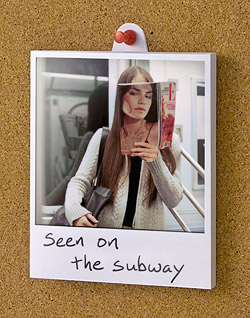 If you’re the sort of person who prefers to pin your Polaroid pictures to your cork board in your cubicle, you can take advantage of this innovative feature: The stand on the back of the frame can rotate to an upward position, sticking up above the top of the frame and revealing a hole for you to stick a pushpin through. The rechargeable internal battery allows you to showcase your photos that way even if you don’t want a wire dangling down from your cork board.
 But that still seems like an awful lot of work to get a human. Why doesn’t someone create an application that does all the work for me? Let me select what company I need to call, and then use my modem to call them and do all that number-pressing automatically. At the last step, play a sound so I know to pick up my phone. Or just turn up the speaker on my computer so I can hear when a human picks up. Of course, not everyone has a modem any more, so the program could also come as a Skype plug-in and in cell phone versions for different mobile operating systems.

 Yesterday, I














 There’s an article on-line from Money Magazine called “
 So how about making a Digital Jewel Box? Here’s how it would work: The DJB sits next to your stereo or computer in its charging dock. Similar to a digital picture frame, it syncs wirelessly to your home network via WiFi, syncing itself with iTunes or whatever digital player you use. When a new song comes on, the DJB’s screen shows the album cover art for that song.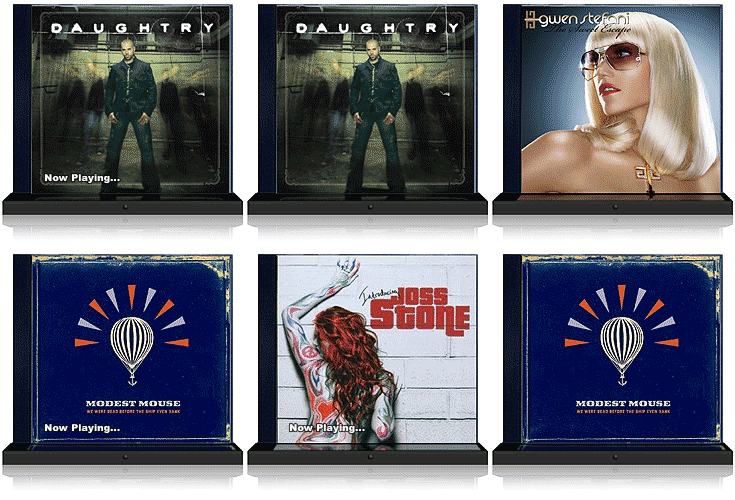
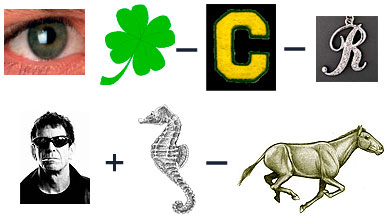

 A few people have asked me if I have any Joost beta invitations since I recently wrote about
  I’ve been participating in the beta test of a hotly anticipated new program called Joost. It’s essentially a video-on-demand service from the people who brought you Kazaa and Skype, which uses proprietary technology to make high quality video over the internet as instant as your TV. Unlike video sharing sites such as YouTube, you won’t get to upload your own videos to Joost. They will provide the content through contracts with various TV and movie companies, and show the programs in appropriate Channels. For example, they might have an NBC Channel where you can catch up on episodes of Heroes. Or you might go to the Warner Brothers Movie Channel to watch the movie Batman.
 In Writer Mode, whenever I pause the program I’m watching, a window pops up that I can type in. Joost uses a time stamp to remember where I was in the program when I wrote this comment, and also remembers where on the screen I’ve put the window. Then I can type in any comment I want. Preferably, it’s either informative about the particular scene (e.g. “This scene was filmed at Maine North High School in Chicago”), or it’s a funny comment on the scene. I can tag it appropriately as “funny” or “informative” so Joost knows how it’s intended.
 In Voter Mode, I watch the movie with a window overlaid in which all the comments people left scroll up automatically. I get to vote every comment up or down based on whether I agree that it’s funny or informative or neither of the above. In my illustration, all the comments are white, but perhaps they would be different colors to specify funny or informative. If there are too many comments to reasonably vote on so quickly, I can tell Joost to not show me every comment so that it’s more manageable. I can set the pace myself. Or I can just vote on the ones that jump out at me, ignoring the others.
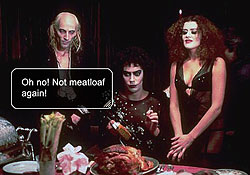 In Viewer Mode, I can watch a program or movie with comments turned on. They will show up where and when the commenter specified, and then disappear after a few seconds. Because people read at different paces, I can control how many pop-ups I want per minute. If I say I want 12 per minute, only the 12 highest rated pop-ups will be shown in each minute of the program. I can specify if I want to see just the funny comments, or just the informative comments, or both. I can choose to read the highest-rated comments of all time, or just of the last month or week or day. I could watch the same program week after week and experience it with a whole new set of commentary. And at any time, I can switch to a different mode if I think of a new comment to add or if I want to vote down a lame comment I just read.
 But maybe that could have been ameliorated if the technology had been used for entertainment purposes. What if the cameras scanned the crowds at the Superbowl and built a new database as it went, instead of using a database of known criminals, to find the two people in the audience who looked the most alike? It would be interesting to see, in a crowd of 100,000 people, how close a match can be found among strangers. Then, at halftime or during breaks in the action, the Jumbotron could showcase the closest matches in a series of “Separated at Birth?” moments.









 The news lately has been full of
 By now, you either recognize the name, or you’re wondering who Seetharaman Narayanan is, and the difference probably depends on what you do for a living. If, like me, you have a job where you launch Photoshop on a daily basis, then maybe, like me, you can’t stop staring at this guy’s name on the Splash Screen every time it launches. Seetharaman Narayanan. It’s hard to look away. Sure, other people worked on Photoshop. But nobody else has a name like Seetharaman Narayanan.

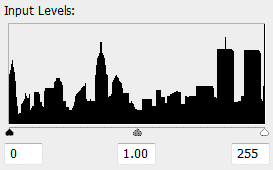
 Each “-ist” website has its own cute logo following the same theme: a few sillhouettes of buildings, other architecture or landmarks, followed by “citynameist.” Each one also features a different colorful background. The original Gothamist logo, above, was designed by Sam Park, of










 The radio station 1010 WINS is for New York City what CNN Headline News is for cable television. It’s just nonstop headlines, weather, and traffic, repeating every 22 minutes. Their slogan is, “You give us 22 minutes, and we’ll give you the world.” Their website,
  The crown jewel of the 1010 WINS Art Collection is Peace Grannies on Trial for Times Square Protest. For
  It’s a classic struggle for every artist. How do you illustrate a
  The influence of conceptual artist
  Nearly five years after the tragic events of September 11, 2001, audio tapes were released featuring conversations between 911 operators and people trapped in the World Trade Center. For the event, the 1010 WINS artist created this commemorative work. On the day the tapes were released, a cell phone was so clearly important — a modern technological luxury but also an icon of this day in history — that it seemed like an object as large as the towers themselves. Or perhaps slightly larger, in black and white, looking a bit like it was photocopied and then faxed a few times before being scanned in for a montage.
 The ashy, veiny hand reaches out, gas pump nozzle in hand, a stream of “S”es pouring forth from its spout like precious drops of gasoline. Together, the hand and pump give off an eerie glow as Honest Abe looks onward, his gaze obstructed by an exaggerated dot screen. George Washington is barely visible, shrouded by an orange shadow of depression. The











 I had the pleasure this evening of attending the opening of a new exhibit at the


 Why doesn’t someone make a compass to help you find your car in the parking lot? This should be an optional accessory for every GPS-enabled car. You should be able to get a keychain or purse-sized device that will point to your car so you can find it when you come out of the mall, grocery store, etc.

 So yesterday AOL launched its new free TV On-Demand service called